
Boxes of paperwork. Filing cabinets full of old records. Archived customer files. Invoices, contracts, correspondence and documents that haven't been touched for years.
For many businesses, going paperless sounds like a great idea.
Actually getting through years of accumulated paperwork is another matter.
Using a conventional office printer or flatbed scanner can make digitising hundreds or thousands of documents an incredibly slow process. Each document needs to be positioned, scanned, removed and replaced with the next one.
If your business has a large backlog of paperwork to digitise, there's a much faster alternative.
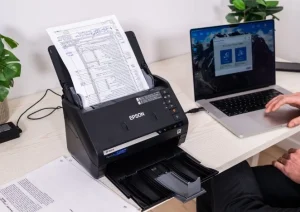
At DIYPhotoScan, our Epson FastFoto FF-680W scanners aren't limited to photographs. They can also be used for fast document scanning, making them a practical option for businesses that need to complete a one-off workplace digitisation project without purchasing another piece of office equipment.
Hire the scanner, use it at your workplace to tackle your backlog and return it when the project is complete.
Why Are Businesses Digitising Their Paper Records?
Walk into the storeroom of many established businesses and you'll find years of paperwork.
Some of it may need to be retained. Some may simply never have been sorted.
Either way, physical records take up space.
Digitising suitable documents can help businesses create a more manageable electronic archive while reducing their reliance on filing cabinets and storage boxes.
Digital records can be easier to:
- Organise.
- Search.
- Back up.
- Share internally.
- Access remotely.
- Duplicate.
- Store without occupying valuable office space.
A digitisation project can also be particularly useful when relocating premises, clearing an office, reorganising storage or moving towards a more paperless way of working.
The Problem With Using Your Office Printer
Your multifunction office printer probably has a scanner.
That's perfectly adequate when someone needs to scan a contract or a few pages.
It's a very different proposition when someone walks into the archive room and discovers 20 boxes of documents.
Scanning thousands of pages individually can consume hours of staff time.
That's why dedicated document scanners are designed differently.
Rather than repeatedly positioning individual pages on glass, an automatic feed scanner can process compatible documents consecutively.
Load the documents, start the scan and allow the machine to work through them.
For a large workplace digitisation project, that can make an enormous difference.
What Is a Double-Sided Document Scanner?
Double-sided scanning is particularly valuable in a workplace.
If you have 2,000 sheets containing information on both sides, a conventional single-sided process potentially means dealing with 4,000 individual page images.
A double-sided scanner can capture the front and reverse during the same pass.
That makes it particularly useful for items such as:
- Business correspondence.
- Archived paperwork.
- Forms.
- Invoices.
- Statements.
- Reports.
- Historical company records.
- Membership records.
- Club and association documents.
- Suitable contracts and agreements.
The less manual intervention required, the quicker a large scanning project can become.
Hire a Fast Scanner Instead of Buying One
This is where DIYPhotoScan offers businesses a different option.
You may not need another scanner permanently.
You might simply have accumulated ten years of paperwork that needs digitising.
Once it's finished, what happens to the scanner you purchased?
It sits in a cupboard.
Hiring can make much more sense for a one-off digitisation project.
You can bring in a fast scanner for a defined period, allocate someone to the project, process the documents and then return the equipment.
There's no need to make a long-term investment in equipment your business may rarely use again.
A Practical Example
Imagine you're moving offices and discover:
15 archive boxes of paperwork.
Your staff could spend days trying to process everything using the office photocopier.
Alternatively, you could create a dedicated scanning station.
Set up the scanner on a desk with a laptop or computer.
Then organise the paperwork into categories such as:
2019 → Supplier Documents
2020 → Customer Correspondence
2021 → General Records
2022 → Invoices
Compatible documents can then be processed in batches and saved into the appropriate folders.
Instead of scanning whenever someone has a spare five minutes, you've turned it into a structured digitisation project.
DIYPhotoScan Tip: Prepare Before Your Scanner Arrives
The scanner shouldn't arrive before you've looked at the paperwork.
Do the preparation first.
Remove anything you don't need to digitise and organise the remaining documents into logical batches.
Remove staples, paper clips and other items that shouldn't pass through the feeder.
Create the folders you'll be saving the documents into.
Then, when your hire begins, your staff can concentrate on scanning rather than sorting.
For large projects, this can make a considerable difference to how much you accomplish during the rental period.
What Types of Organisations Could Use Scanner Hire?
Workplace document scanning isn't limited to large corporations.
A temporary scanner could be useful for:
Small businesses clearing years of paperwork.
Accountancy practices working through suitable archived records.
Solicitors and professional offices undertaking permitted digitisation projects.
Schools and educational organisations digitising appropriate historical records.
Charities archiving paperwork and historical material.
Sports clubs and associations preserving membership and organisational history.
Churches and community organisations digitising archives.
Photographers dealing with both printed photographs and paperwork.
Estate and property businesses digitising suitable historic files.
Family businesses preserving decades of company records, photographs and documents.
The common factor isn't the industry.
It's having a lot of paper and a project that needs completing quickly.
Don't Forget Your Company's Photographs
There's another advantage to using the Epson FastFoto.
Once you've dealt with suitable documents, you can also use the same hire to digitise your organisation's old photographs.
Many established businesses have boxes containing:
- Staff photographs.
- Previous premises.
- Opening ceremonies.
- Company events.
- Newspaper cuttings.
- Product photographs.
- Awards.
- Historical marketing materials.
- Old team photographs.
These can be every bit as important to the history of an organisation as its paperwork.
Instead of creating only a document archive, you could create a complete digital company archive.
How DIYPhotoScan Workplace Scanner Hire Works
The process is straightforward.
1. Choose Your Rental Period
Select a hire period appropriate for the size of your scanning project.
2. We Deliver the Scanner
Your Epson FastFoto FF-680W and the required accessories are delivered to your chosen address.
3. Set Up a Scanning Station
Connect the scanner to your compatible computer and create the folders you intend to use.
4. Start Digitising
Process suitable paperwork in organised batches and save your files.
5. Back Everything Up
Before considering your digitisation project complete, make sure important files are securely backed up in accordance with your organisation's own data-management requirements.
6. Return the Scanner
Once you've finished, simply repack the equipment and return it to DIYPhotoScan using the provided return arrangements.
Important: Think About Data Protection and Record Retention
Digitising business documents isn't simply about scanning everything and throwing the originals away.
Organisations may have legal, regulatory, contractual, tax, confidentiality or data-protection obligations relating to particular records.
Before destroying original documents, make sure your organisation is permitted to do so and that your digital storage arrangements meet any requirements that apply to your business.
Sensitive documents should also be handled, stored and backed up appropriately.
DIYPhotoScan provides the scanning equipment; decisions about what should be digitised, retained, destroyed or securely stored remain with your organisation.
Could You Complete Your Backlog in One Focused Project?
If your filing cabinets are overflowing, the answer isn't necessarily to buy another scanner.
Think of it as a project instead.
Prepare → Hire → Scan → Organise → Back Up → Return.
Set aside the time.
Allocate someone to it.
Get through the backlog.
Then return the equipment when the job is done.
At DIYPhotoScan, we make it possible to hire an Epson FastFoto FF-680W for your workplace rather than purchasing equipment for a one-off scanning project.
And once the paperwork is under control, don't forget those boxes of old company photographs.
You might be able to preserve decades of your organisation's history at the same time.