
There’s something strangely daunting about a box of old photographs.
You open it intending to sort through a few, then suddenly you’re holding a picture from a family holiday 30 years ago, a photograph of your grandparents you’d forgotten existed, or a childhood snap that nobody else in the family has a copy of.
The problem is that printed photographs don’t last forever. Colours fade, prints become damaged and boxes get moved from one loft or cupboard to another. Digitising them makes sense, but sending hundreds or thousands of irreplaceable originals away to a scanning company doesn’t feel right for everyone.
That’s where photo scanner hire offers a useful alternative.
Instead of posting your photographs to somebody else, you can hire a professional high-speed scanner, have it delivered to your home and digitise everything yourself. Your photographs stay with you, you decide how they’re organised, and you can save the digital files directly to your own computer.
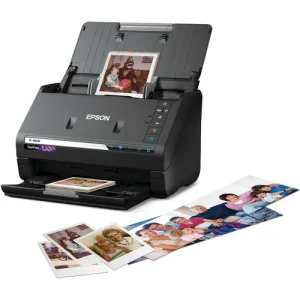
At DIYPhotoScan, we provide the Epson FastFoto FF-680W for exactly this purpose. It’s designed to make scanning large collections of photographs surprisingly quick, without requiring specialist technical knowledge.
What Is an At-Home Photo Scanning Service?
A traditional photo scanning service normally works like this: you pack up your photographs, send or deliver them to a company, wait while they’re scanned, and then receive your originals and digital files back.
An at-home service using photo scanner hire turns that process around.
Rather than sending the photographs away, the scanner comes to you.
You choose how long you need it, receive the scanner at home and work through your collection at your own pace. Once you’ve finished, you return the scanner.
This approach works particularly well if you have a large collection of family photographs. You might have 500 prints in a drawer, several thousand spread across old albums, or decades of photographs inherited from parents or grandparents.
And because everything happens at home, you can stop whenever you find something interesting.
That matters more than you might expect. Scanning family photographs isn’t always just an admin job. You’ll often want to ask relatives who somebody is, check the date of a wedding, work out which holiday a photograph came from, or simply spend a few minutes enjoying memories you haven’t seen for years.
Why Photo Scanner Hire Can Be Better Than Sending Photos Away
There’s nothing inherently wrong with using a professional scanning bureau. For some people, paying somebody else to do everything is exactly what they want.
But there are several reasons why families prefer to scan their own photographs.
Your photographs never leave your possession
This is probably the biggest one.
A digital file can be copied. An original photograph of your grandparents’ wedding, your parents as children or a relative who is no longer with you cannot.
Posting an irreplaceable collection can understandably make people nervous.
With DIYPhotoScan, you scan your memories privately at home. The photographs remain in your possession throughout the project and the scans are saved directly to your own computer.
There’s no need to hand your family archive to somebody else.
You stay in control of the organisation
If you have 4,000 photographs, you probably don’t want to end up with one enormous folder containing 4,000 randomly numbered JPEGs.
Scanning at home lets you organise as you go.
You could create folders such as:
- Mum & Dad – 1970s
- Family Holidays – 1980–1989
- School Photos
- Christmas
- Weddings
- Grandparents
- Children – Early Years
You don’t need a perfect filing system before you begin, but even a rough structure makes finding photographs much easier later.
You can decide what deserves scanning
Not every photograph needs to be preserved.
Most family collections contain duplicates, blurred pictures, accidental shots of somebody’s feet and photographs where nobody can remember why they were taken.
When you’re doing the scanning yourself, you decide what stays.
You can also rescan an important photograph immediately if you’re not happy with the first result.
The Big Difference: You Don't Have to Scan One Photo at a Time
People sometimes hear “photo scanner” and imagine a traditional flatbed scanner.
Place one photograph on the glass. Close the lid. Press scan. Wait. Open the lid. Remove it. Repeat.
That’s manageable for 20 photographs.
It’s considerably less appealing when there are 5,000.
DIYPhotoScan supplies the Epson FastFoto FF-680W, a high-speed scanner specifically suited to large photo collections.
Rather than positioning each photograph individually, you can load multiple suitable prints into the automatic feeder. The scanner feeds them through one after another.
It can scan at around one photograph per second, which completely changes the scale of the job.
The average DIYPhotoScan customer digitises 3,500+ photographs during a rental.
Instead of spending weeks sitting beside a flatbed scanner, the actual scanning can become one of the quickest parts of the project.
What Quality Can You Expect From an Epson FastFoto?
Speed would be fairly pointless if the resulting scans weren't worth keeping.
The Epson FastFoto FF-680W supports scanning at 300 or 600 dpi, saving photographs as JPEG files.
For many family collections, 300 dpi provides a good balance between image quality, scanning speed and file size. If you have particularly important photographs or want additional detail for archiving, 600 dpi is available.
The software can also help with common problems found in older prints, including automatic colour correction, rotation, cropping and red-eye removal.
That can make a noticeable difference to photographs that have been sitting in albums since the 1970s or 1980s.
Another useful feature is double-sided scanning. If somebody wrote “Cornwall 1982” or “Grandad & George” on the back of a photograph, that information can be just as valuable as the picture itself.
You can see more of the scanner's capabilities and technical specifications on the DIYPhotoScan website.
What Can You Scan at Home?
The obvious answer is printed photographs, but a family archive usually contains much more than standard 6 × 4 prints.
The FastFoto can handle common photo sizes as well as suitable postcards, panoramas and other printed material. It can also scan double-sided documents into PDF, making the rental useful if you have paperwork you want to digitise at the same time.
The scanner supports items from approximately 51 mm × 51 mm up to 216 mm × 910 mm, with a maximum thickness of 1.24 mm, including postcards.
A scanner sleeve is also included for fragile, small or damaged photographs.
Very old photographs deserve a little more care. If a print is badly cracked, curled, torn, sticky or particularly precious, don't simply put it into a stack with newer photographs. Use the supplied carrier sleeve where appropriate and handle delicate originals individually.
How Photo Scanner Hire Works With DIYPhotoScan
We've deliberately kept the rental process straightforward because the whole point is to make a large scanning project easier, not add another complicated job to your list.
1. Choose your rental period
DIYPhotoScan currently offers four rental periods:
| Rental period | Price |
|---|---|
| 3 days | £85.95 |
| 7 days | £95.95 |
| 14 days | £135.95 |
| 30 days | £165.95 |
Free UK delivery and return are included.
The seven-day option is particularly useful for a typical family collection because it gives you time to sort, scan and organise without feeling that everything has to be completed in a single afternoon.
If you've inherited several large boxes of photographs or you're tackling a particularly big archive, choosing 14 or 30 days gives you more breathing room.
2. Receive the scanner at home
Your rental begins on the day the scanner is delivered.
Inside you'll receive the Epson FastFoto FF-680W together with the equipment you need to get started, including the power supply, USB cable, USB-C adapter, scanner sleeve for fragile photographs and lens wipes.
There's also a PDF guide and video tutorial.
The scanner works with both Windows and Mac computers.
3. Install the software and start scanning
Download the free Epson software, connect the scanner and you can begin.
Although the FastFoto supports USB and Wi-Fi connectivity, we recommend using the included USB connection when you're scanning large batches because it provides a stable connection.
No specialist scanning experience is required.
You can read the DIYPhotoScan setup and scanning guide before your rental arrives if you'd like to see how the process works.
4. Return the scanner
When you've finished, pack the scanner securely back into its original packaging.
You can use the prepaid return option and either print your return label or use the supplied QR code at a suitable DPD drop-off location with label-printing facilities.
If you'd rather not make the trip, a DPD home collection can be arranged for £12.00.
How to Prepare Before Your Scanner Arrives
If there’s one piece of advice that can save you hours, it’s this:
Sort first. Scan second.
The FastFoto is extremely quick. Your preparation will often take longer than the scanning itself.
Don't wait until your rental starts before opening 14 boxes and trying to work out which photograph belongs where.
A few evenings of preparation beforehand can make a huge difference.
Start by getting your photographs into broad groups. You don't necessarily need to identify the exact date of every picture. Something as simple as “1970s”, “1980s holidays”, “school”, “weddings” and “unknown” is enough to get started.
Remove photographs carefully from albums where appropriate and take out anything that could cause problems when feeding, such as staples, paper clips or sticky notes.
Try to group similar-sized photographs together too. Feeding a reasonably consistent stack is easier than mixing tiny prints with large postcards.
Finally, decide where the digital files will be stored on your computer and create your folders beforehand.
Then, when the scanner arrives, you're ready to get on with the enjoyable part.
What Should You Do With Your Photos After Scanning?
Scanning isn't quite the end of the project.
Once you've created your digital archive, back it up.
A useful rule is to avoid having your entire family photo collection stored in only one place. A laptop can fail. An external hard drive can be lost. Cloud accounts can become inaccessible.
Ideally, keep more than one copy.
For example, you might have the main collection on your computer, another copy on an external hard drive and a further backup using a reputable cloud storage service.
Once everything is digital, sharing becomes much easier too.
You can send old family photographs to relatives, create photo books, display them on digital frames or give family members their own copy of the complete archive.
And because the originals have been digitised, you no longer need to handle precious prints every time somebody wants to see them.
Is Hiring a Photo Scanner Worth It?
For a large one-off project, it often makes much more financial sense than buying a high-quality scanner.
Buying an Epson FastFoto simply to scan the family collection means spending several hundred pounds on equipment that may be used intensively for a week or two and then sit in a cupboard.
Hiring gives you access to the equipment for the period when you actually need it.
It can also compare favourably with paying a scanning company on a per-photo basis, particularly if you have thousands of prints.
A 7-day photo scanner hire currently costs £95.95, including free UK delivery and return. If you scan 3,000 or 4,000 photographs during that period, the cost per photograph becomes very small.
Just as importantly, you're doing it in your own home with the originals beside you.
A Weekend Project That Can Preserve Decades of Family History
People often put photo scanning off because the collection looks overwhelming.
Ten albums become twenty. Another box appears in the loft. Then somebody hands you your parents' collection.
The trick is not to think of it as “I need to scan every photograph my family has ever taken”.
Start with one box.
Sort it into sensible batches. Create your folders. Scan a stack. Check the results. Then continue.
Once you see how quickly a high-speed scanner works, a collection that looked like a six-month project suddenly becomes manageable.
And there’s a lovely side effect: you actually look at the photographs again.
Instead of old prints sitting unseen in a cupboard, they become something the whole family can enjoy.
Frequently Asked Questions
What is the best way to scan thousands of old photos?
For large collections, an automatic-feed photo scanner is significantly more practical than scanning every print individually on a flatbed. Photo scanner hire gives you access to a high-speed scanner such as the Epson FastFoto FF-680W without having to buy one outright.
How long does it take to scan 1,000 photos?
The Epson FastFoto can scan at around one photo per second under suitable conditions, although your total project time will also include loading, sorting, checking and organising the photographs. Preparing your collection before the scanner arrives is one of the best ways to make the most of your rental.
Is it safe to put old photographs through a photo scanner?
The FastFoto is designed for scanning photographs, but very fragile, damaged, curled or unusually valuable originals should always be treated with additional care. DIYPhotoScan includes a scanner sleeve for fragile, small or damaged photographs, and delicate prints can be handled individually rather than mixed into a batch.
Should I scan old photos at 300 or 600 dpi?
For everyday family archiving and sharing, 300 dpi can provide an excellent balance between quality, speed and manageable file sizes. Choosing 600 dpi captures additional detail and can be worthwhile for particularly important photographs or images you may want to enlarge later.
Can I hire a photo scanner instead of sending my photos to a scanning service?
Yes. That's exactly what DIYPhotoScan is designed for. The scanner is delivered to you so you can digitise the photographs at home, meaning your original family photographs never need to be posted to a third-party scanning company.
Can I hire a photo scanner for longer if I don't finish?
Yes, extensions may be possible subject to scanner availability. If you think you'll need additional time, contact DIYPhotoScan as early as possible so the available options and extra daily charge can be confirmed.
Bring Your Old Photographs Back Into Everyday Life
Those boxes in the loft aren't really boxes of photographs. They're birthdays, weddings, holidays, grandparents, childhood homes and people whose stories deserve to be kept.
Digitising them doesn't have to mean handing them over to somebody else or spending hundreds of pounds buying equipment you'll rarely use again.
With DIYPhotoScan photo scanner hire, you can have an Epson FastFoto FF-680W delivered to your home, scan your photographs privately and save them directly to your own computer.
Rental periods start from £85.95 for 3 days, with 7 days at £95.95, 14 days at £135.95 and 30 days at £165.95. Free UK delivery and return are included, along with the cables, USB-C adapter, fragile-photo scanner sleeve, setup guide, video tutorial and friendly phone and WhatsApp support.
Choose the rental period that suits your collection, get the photographs ready and book your photo scanner hire with DIYPhotoScan.
Your old photographs have already waited long enough.